Coding Styleguide
General Rules
The rules below apply to all the languages used in the project.
Indentation
Indent by one tab character at a time. In your editor, make sure that you have an actual tab character set for indentation and not spaces. Adjust how many spaces should be used for displaying tabs according to your preference.
The only exception from this rule are JSON and YAML files where tab indentation is not allowed. Use 2 spaces instead.
Quotation marks
Use double quotation marks (" ") wherever possible unless nested ("''").
HTML
Capitalisation
Use lowercase for standard HTML tags and PascalCase for React components.
CSS, Tailwind and Sass
Formatting
If using multiple selectors, give each its own line:
.selector1,
.selector2,
.selector3 {

}
Place @apply directives for including Tailwind styles in separate lines:
.selector {
    @apply py-8
        text-blue
        rounded;
}
Methodology
BEM Use (Block-Element-Modifier) for components (elements, blocks), with PascalCased block part (if components has more than one word), double underscore (__) as separator of children elements and double dash (--) as modifier, i.e.:
.BookingWidget {

}

.BookingWidget__title {

}

.BookingWidget--featured {

}
For non-component classes (e.g. utility classes) use lowercase with single dash to separate words and double dash modifier if needed, e.g. display--desktop.
Use ampersand (&) to represent parent selector when nesting components
.BookingWidget {
    &__title {

    }

    &--featured {

    }
}
Rules order
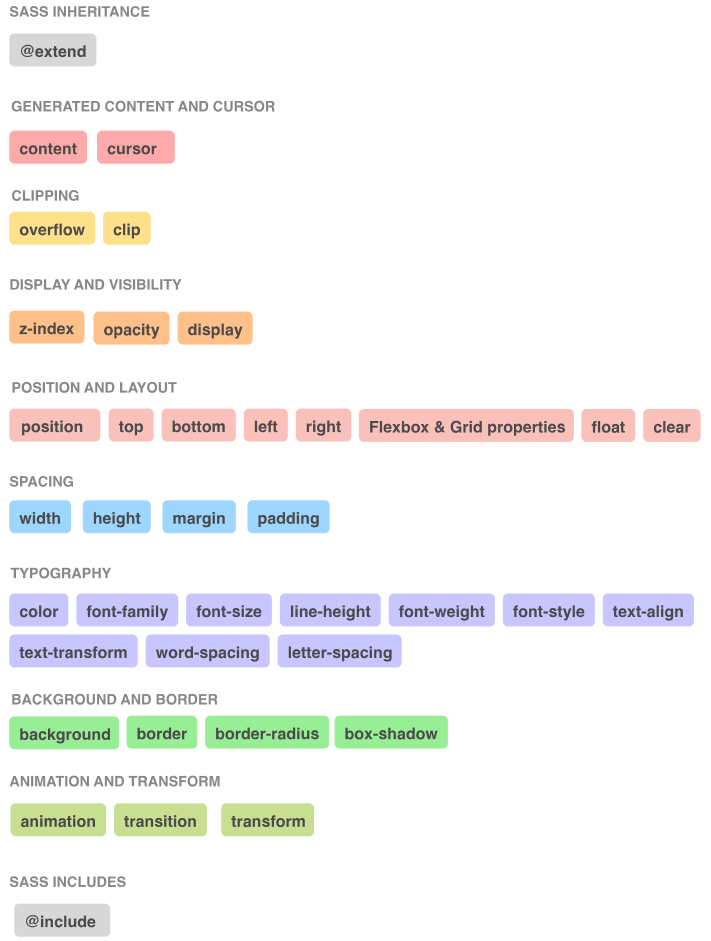
Maintain the order of CSS rules in the code as shown below.
IDs and JavaScript hooks
Avoid using IDs, particularly when nested within classes. For JavaScript hooks, use classes instead, and prefix them with js- so the purpose - scripting not styling - is clear, e.g.:
<div class="Form js-form">
    ...
</div>